Posts

Types of Cloud Computing

Image
Cloud Computing From traditions we are working with the physical machines and Virtual machines, as an Administrator or a Developer we will be facing plenty of issues like hardware failure, security issues and a lot more. Cloud is the best solution for all the points.  Cloud computing is a model for enabling on-demand network access to a shared pool of configurable computing resources (e.g., networks, servers, storage, applications, and services) that can be rapidly provisioned and released with minimal management effort or service provider interaction.   Best AWS Training Institute in Gurgaon... Types of Cloud Computing. 1.      Public Cloud   A public cloud is a type of computing in which a service provider makes resources available to the public via the internet. The whole computing infrastructure is located on the premises of a cloud computing company that offers the cloud service. The location remains, thus, separate from the customer and he h...

How to Create an AWS IAM Read-Only User Account

Image
In this blog post, I will show you how to create a read-only AWS account for view only purposes. It is very common to give read-only access to AWS when you need to give specific people access to view your AWS configuration. In cases like that, you don’t need to give them access to create or configure services. Best Training Institute in Noida… Get started To get started, I will log in to the AWS management console and create an IAM user. From the AWS console search for IAM and click on Users from the left navigation menu. From   the users’ menu, click on Add user. In my case, I will call the user Read Admin and give it AWS management console access only. If need I can also enable programmatic access. In the permissions page, I will select Attach existing policies directly. I will use the Filter policies drop-down menu, I will select AWS managed — job function, as shown below. From the policy name, I will select View Only Access I will finish the wizard and log is as I read the only...

How to host static website using S3 in AWS

Image
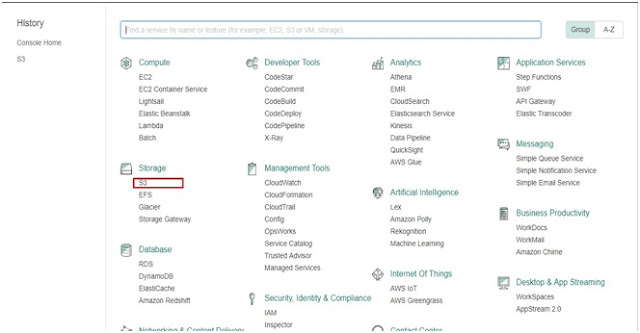
In this tutorial we will learn to host a static website using Amazon S3. for this tutorial you need a domain. First you will finish configuring your S3 bucket   then you will add CNAME record in DNS provider pointing to your S3 Bucket.      Step 1: Go to AWS Console and click on S3. Step 2: Click on Create Bucket. Step 3: Enter the bucket name. Bucket name must be same as domain name. Click on create.          Step 4: Click on the bucket that you have created now.   Step 5: Click upload. Step 6: Click on add files and upload all the files of your website.  You  can also create folder an put your files according to the  folder.  In our tutorial we have uploaded only index.html. Index.html file sufficient for this tutorial. Step 7: After you have uploaded all your files then click on Upload Step 8: Now click on Properties and click on Static Website Hosting. Step 9: Click on use this bucket to host a website. Step 11: ...

What is Amazon RDS?

Image
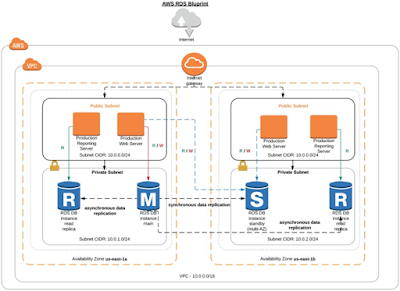
AMAZON RDS Amazon RDS is a service which provides database connectivity through the Internet. RDS makes it very simple and easy to set-up a relational database in the cloud. Instead of concentrating on database features, you can concentrate more on the application to provide high availability, security, and compatibility. RDS is a fully managed RDBMS service. Benefits of Amazon RDS 1.      Reduced Administration Burden ·         Using RDS, you can easily deploy the database from project conception to production. ·         There is no need to install any database software and provide the infrastructure. ·         AWS automatically installs the latest software patches to the RDS instance which you have launched. 2.      Cost-effective ·        You just pay for what you use, and n...

What is Amazon EC2 -- Elastic Compute Cloud

From traditions we are working with the physical machines and Virtual machines, as an Administrator or a Developer we will be facing plenty of issues like hardware failure, security issues and a lot more. As cloud is the best solution for all the points, Amazon EC2 service is a way out for this. Amazon EC2 provides a virtual computing environment, known as Instances. We can launch as many instances we need using the predefined templates known as Amazon Machine Images (AMI). Best AWS Training  Institute In Gurgaon. We can choose any one of the purchasing option while launching an instance according to our necessity, as of now AWS is having 4 different types of Purchasing options, On-demand, spot instances, reserved and dedicated. Various configurations of cpu, memory and networking capacity of the instances are categorized as the Instance types. Mainly 5 instance types are available in EC2 like General Purpose, Compute Optimized, Memory Optimized, Storage Optimized and GPU ins...

AWS Training in Noida - AP2V Academy

Today, more than a million customers are using Amazon Web Services (AWS) in an attempt to perform faster, more scalable applications at lower IT costs. AWS is an evolving cloud computing program from Amazon.com. There is a rapid demand for professionals with in-depth knowledge about the platform and Amazon’s cloud computing services in IT today. AP2V Academy offers  AWS Training in Noida  and is an authorized training partner of AWS, offering students the skills to deploy, design and operate enterprise level infrastructure and applications in the cloud. Whether you’re new in this field or have prior experience, getting your AWS certification will help you succeed further in your IT career. Get Heavy Discount on Online Training! Apply Now. - https://www.ap2v.com/aws-training-in-noida.html