Posts

How do I launch an Amazon Elastic Compute Cloud (Amazon EC2) instance from a custom Amazon Machine Image (AMI)?

 To launch a new EC2 instance from an Amazon Machine Image (AMI), do the following: 1. Open the EC2 console. Note: Be sure to select the AWS region you want to launch the instance in. 2. From the navigation bar, choose AMIs. 3. Find the AMI you want to use to launch a new instance. To begin, open the menu next to the search bar, and then choose one of the following: If the AMI you’re using is one that you created, select Owned by me. If the AMI you’re using is a public AMI, select Public images. If the AMI you’re using is a private image that someone else shared with you, select Private images. Note: The search bar automatically provides filtering options, as well as automatically matching AMI IDs. 4. Select the AMI, and then choose Launch. 5. Choose an instance type, and then choose Next: Configure Instance Details. 6. Review the Instance Details, and then choose Review and Launch. 7. Choose your preferred boot volume, choose Next, and then choose Launch. 8. Select an existing key...

Differences Between Public Private & Hybrid Cloud

  Public Cloud A public cloud is a type of computing in which a service provider makes resources available to the public via the internet. The whole computing infrastructure is located on the premises of a cloud computing company that offers the cloud service. The location remains, thus, separate from the customer and he has no physical control over the infrastructure.Resources vary by provider but may include storage capabilities, applications or virtual machines. Public cloud allows for scalability and resource sharing that would not otherwise be possible for a single organization to achieve. Eg: Amazon Web Services, Microsoft Azure, Google Cloud Platform Best AWS Training Institute in Gurgaon Private Cloud  Private cloud is a type of cloud environment where the cloud software is managed by internal IT. Private Cloud provides the same benefits of Public Cloud, but uses dedicated, private hardware. Private cloud means using a cloud infrastructure (network) solely by one c...

What is Specifying Security Groups and Key Pairs in AWS?

Security Groups   When we launch an instance in a VPC, you must specify a security group that's created for that VPC. After you launch an instance, you can change its security groups. Security groups are associated with network interfaces. Changing an instance's security groups changes the security groups associated with the primary network interface (eth0). Best AWS Training Institute in Gurgaon A security group acts as a virtual firewall for your EC2 instances to control incoming and outgoing traffic. Inbound rules control the incoming traffic to your instance, and outbound rules control the outgoing traffic from your instance. When we launch an instance, we can specify one or more security groups. If we don't specify a security group, Amazon EC2 uses the default security group. You can add rules to each security group that allow traffic to or from its associated instances. You can modify the rules for a security group at any time. New and modified rules are autom...

Types of Cloud Computing

Image
Cloud Computing From traditions we are working with the physical machines and Virtual machines, as an Administrator or a Developer we will be facing plenty of issues like hardware failure, security issues and a lot more. Cloud is the best solution for all the points.  Cloud computing is a model for enabling on-demand network access to a shared pool of configurable computing resources (e.g., networks, servers, storage, applications, and services) that can be rapidly provisioned and released with minimal management effort or service provider interaction.   Best AWS Training Institute in Gurgaon... Types of Cloud Computing. 1.      Public Cloud   A public cloud is a type of computing in which a service provider makes resources available to the public via the internet. The whole computing infrastructure is located on the premises of a cloud computing company that offers the cloud service. The location remains, thus, separate from the customer and he h...

How to Create an AWS IAM Read-Only User Account

Image
In this blog post, I will show you how to create a read-only AWS account for view only purposes. It is very common to give read-only access to AWS when you need to give specific people access to view your AWS configuration. In cases like that, you don’t need to give them access to create or configure services. Best Training Institute in Noida… Get started To get started, I will log in to the AWS management console and create an IAM user. From the AWS console search for IAM and click on Users from the left navigation menu. From   the users’ menu, click on Add user. In my case, I will call the user Read Admin and give it AWS management console access only. If need I can also enable programmatic access. In the permissions page, I will select Attach existing policies directly. I will use the Filter policies drop-down menu, I will select AWS managed — job function, as shown below. From the policy name, I will select View Only Access I will finish the wizard and log is as I read the only...

How to host static website using S3 in AWS

Image
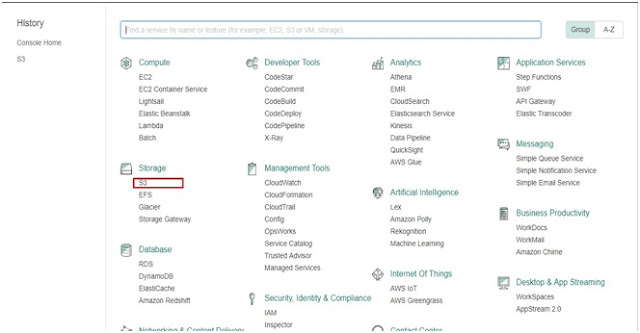
In this tutorial we will learn to host a static website using Amazon S3. for this tutorial you need a domain. First you will finish configuring your S3 bucket   then you will add CNAME record in DNS provider pointing to your S3 Bucket.      Step 1: Go to AWS Console and click on S3. Step 2: Click on Create Bucket. Step 3: Enter the bucket name. Bucket name must be same as domain name. Click on create.          Step 4: Click on the bucket that you have created now.   Step 5: Click upload. Step 6: Click on add files and upload all the files of your website.  You  can also create folder an put your files according to the  folder.  In our tutorial we have uploaded only index.html. Index.html file sufficient for this tutorial. Step 7: After you have uploaded all your files then click on Upload Step 8: Now click on Properties and click on Static Website Hosting. Step 9: Click on use this bucket to host a website. Step 11: ...

What is Amazon RDS?

Image
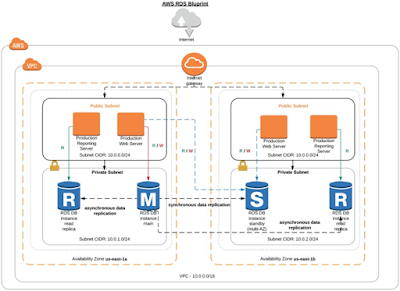
AMAZON RDS Amazon RDS is a service which provides database connectivity through the Internet. RDS makes it very simple and easy to set-up a relational database in the cloud. Instead of concentrating on database features, you can concentrate more on the application to provide high availability, security, and compatibility. RDS is a fully managed RDBMS service. Benefits of Amazon RDS 1.      Reduced Administration Burden ·         Using RDS, you can easily deploy the database from project conception to production. ·         There is no need to install any database software and provide the infrastructure. ·         AWS automatically installs the latest software patches to the RDS instance which you have launched. 2.      Cost-effective ·        You just pay for what you use, and n...